
Start Times
In this Race Template you have two different types of Start Times. Both are optional, but using them will change how the race looks and functions.
*Note* It is important to know these times are assigned via Course Groups
Journey Start Times
First we have Journey Start Times. Journey Start Times mean the time that Racer will depart a staging area and begin riding towards the start of the first segment. You can set Journey start times for each group or for everyone if is starting at the same time for the whole race.
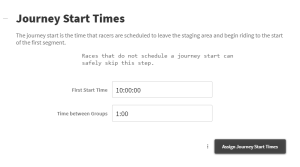
If you have no set time, feel free to skip this
Segment Start Times
Segment Start Times are an option to set Start Times for each Segment. This allows you to have a highly scheduled racer, which each racer having a specific time for each Segment they will do.
Start Interval is the time between each racer. Depending on the expected time of each Segment this can be adjusted to the required value. Time Gap between Groups is to set any gaps between the Start Groups, if needed.
Transfer Times are the times between the Start of Each Segment. So “Transfer to 1st Segment” would be the time they have to get from the Journey Start to the Start of Segment 1. “Transfer to 2nd Segment” is the time they have from the Start of Segment 1 to get to the Start of Segment 2. In the example, the first rider has 30 minutes to get to Segment 1, and another 30 to get to Segment 2. With Journey Start set for 10:00, their start times are 10:30 for Segment 1, and 11:00 for Segment 2. The Second rider starts 30 sec’s behind the first, so their start Times are 10:30:30 and 11:00:30 for the first two Segments.
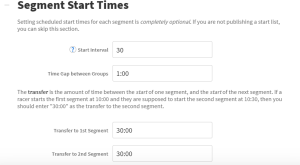

You can also Set for Each Group. This option allows you to see more information, but can also get confusing. Viewing the Start List will also show the scheduled start times for each racer that have been assigned.
Remember that this step is completely optional, and is only for people who need to see a schedule for each run.