Entering Segments
Setting up the Courses
Usually in an Enduro everyone will do the same course. Sometimes though you will have a few categories doing a “Short Course”, which means they won’t do all the Segments. If that is the case you can split the Racers into Course Groups by Category, and then Merge Racer Groups to create a “Long Course” and a “Short Course” group. If not, you can keep all the racers in one group.
Segments
Timing Devices in Enduro race files are grouped by “Segments”. Segments consist of a Start Device and an End Device. You can add as many Segments as you wish with the “Add a Segment” button in the lower right. Some races refer to their Segments as “Stages”, while others have unique names for each one. You can rename the Segments by clicking on the title and editing the text.
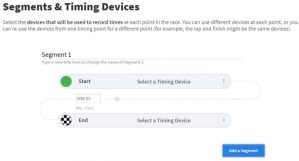
As per usual, select your timing devices and enter a Min. Time for each segment.
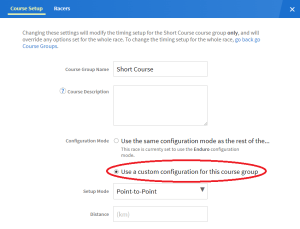
If you have a “Short Course” that is only doing some of the Segments, you’ll have to edit that course. If they are using the same Segments, but not all of them, it is easiest to do this after creating the main course. After you’ve filled in the the Segments for the long course, go back to the top and click the edit button to the right of the “Short Course” course group. In the window that opens, select the option to “Use a custom configuration for this course group”. You can then remove any of the Segments by clicking the three dots beside the End device of the Segment you want to remove and selecting “Remove this Segment”.
If one of your courses is using Segments that are completely different from the rest of the course, you can use the edit feature to enter them before setting the course for the rest of the race. Follow the same steps as above, but note that there won’t be any Segments yet. Doing this first will save you some time from having to erase all the Segments and then creating new ones.