
Timing the Race
If you’ve set everything up correctly, the race should start without any need from you, although if you have someone there they can collect backup start times and Post racer numbers into the Summit. Most of your attention can be then on the finish.
If you are using Activators, the race will proceed without much or any input from you. However if you are using Photocells as primary you’ll have to manage time assignments.
Photocells can’t identify racers. If you have someone at the start, they can Post the racer numbers into the Start Summit. This will assign the start times automatically.
Technically this can be done at the finish as well, but it is probably better to Assign the times in Zone4 after they come in. Unlike at the start the racers are moving, and it’s better to confirm who they are before assigning the times.
When the racer crosses the finish line, you should get a time from both the Finish Summit, and the Finish Activator, as well as whatever backup you have set up. The Summit time will not a have racer number associated with it, but the Activator time should. The racer number associated with the chip will appear in grey on the left of the Times Grid. By entering the racer time in # column over the grey numbers you will assign that time to that racer.
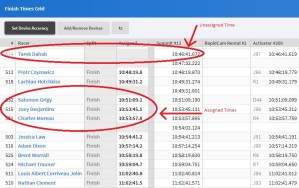
If you make a mistake you can always clear the number of any assigned time. You should always try to make sure the row you are entering lines up with the time that came from your primary device. The other times are their to help you make sense of what happened. This shouldn’t be too challenging during a Time Trial.