
Photocells
Photocells produce highly precise times whenever something breaks their light beam. Their main draw back is that they can be tricky to set up, and they can’t distinguish between one racer and another, or, a non-racer (car, volunteer, cat) that crosses the line. In windy conditions they can even sway enough to break the beam and cause all sorts of extra times to come in.
Set Up
There are different styles of Photocells, but they all come in two parts that need to be setup on opposing sides of the Start/Finish chute, centered on the Start/Finish line. They should be the same height and adjusted so that they are pointed directly at one another. Depending on the stand they are on, this can be tricky to get right, so try to start from a level position close together and then space them out. If you are having trouble, remember that both sides of the photocell can be adjusted.
Photocells don’t always have a clear way to indicate if they are lined up. If you are using a FDS one, it will beep, but using a TagHeuer one will not. However a light will flash on the back of both when the beam is broken. If you connect a Summit to the Photocell, the Summit will beep each time it receives a time from the Photocell (ie when the beam breaks). This can be a good way to see if the Photocell is lined up and working correctly. Every time you cross the beam you should get a beep and a time from the Summit.
Assigning Times
Because the Photocells generate a signal, but no extra data, you will not see a racer number come in with the time from the Summit. This means you need another way to identify the racers.
At the start of a race, you can input a racer number into the Summit, and then hit Post. What this does is it takes that racer number and pairs it with the next Impulse (ie from an external source plugged into Channel 1, or the Impulse button), and sends both that racer number and time into Zone4.
This works for the start, when you know who is starting, and have time to confirm and set the Summit, and even fix it if there is a mistake. It doesn’t work well for finishes, particularly in bike races, as the racers are moving so fast you might not identify them in time. This is why it’s a good idea to always pair Photocells with another timing system, such as GoChips or a RapidCam.
If you are timing a race using Photocells, the Photocell should be your primary device. This means that you will still have to manually assign the times to a racer in Zone4. You can though use GoChips to help identify the racers.
In the Times Grid, you will see several columns displaying different information. Times received from the various timing devices you have set up will appear in their own columns on the right, while racer numbers, names, assigned times, and the lap to which they were assigned all appear on the left. By entering a Racer Number in the leftmost column, you can assign a time in the same row to that racer.
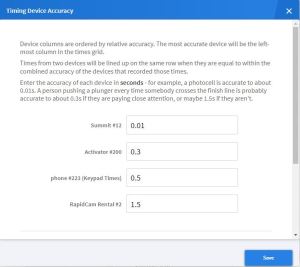
One of the tricks involved, is getting the times from the different devices to line up in the same row. In the top left of the times grid there is a Set Device Accuracy button. Clicking on it will open up a menu where you can set the relative accuracy of each device. Your primary device should have the smallest value entered (say 0.01 seconds), while any manual devices will need larger times. Note that this has no impact on the times produced by the devices, it just ranks and sorts them. For instance, in the image below, the Summit connected to a Photocell is listed as Primary, while the activator is secondary. If times from the activator are within 0.31 seconds of the Summit time, they will appear on the same line. Changing these values will help line up the times so you can assign the correct Photocell time to the correct athlete.
When assigning the times in the Times Grid, be sure to check that you are assigning the leftmost time to the racer. In some cases the rows might not line up, despite having set the Device Accuracy. In this case the time with a racer number associated with it (ie a chip time) will not line up with the Photocell time. Confirm on the Times Grid which time from the Photocell corresponds with the chip time, and then enter the Racer Number on the row containing the Photocell time. This can get a bit messy, so it is a good idea to adjust the Timing Device accuracy to ensure the times line up.