
Editing your Event Page
Now that you have created your Event Page, you can customize it to help show off the Event. Uploading a Header Image will create a banner for the top of the page. You can upload any PNG or JPG file and Zone4 will fit it to the space available.
At the bottom of the page you will find a set of buttons that will provide you options for editing and sharing the Event Page

Under “Edit Event Info & Banner” you will see options to change the Header and also write a description of the event. It can be as long and detailed as you want, but keep in mind this will push other links (such as race results) further down the Event Page

The “Share the Link” button gives you options to share the event publicly. This is a good troubleshoot to check if the results from your event are not showing on Zone4. If the event is not publicly listed (the first option below), no one will be able to see it without a link. The second option allows link sharing, and the third will hide the page entirely. The majority of the time you, or the Event Director, will want the first option selected.
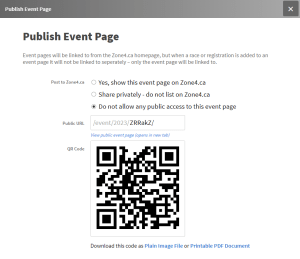
There is also a QR Code provided for you that you can print off and distribute around the Event Site to help people find the Page.