
Creating a Start Groups
After you create a Race File, you will be taken to the Race Overview page. This page allows you to navigate quickly to the different pages of the Race File, as well as shows you what tasks need to be completed before the race can start.
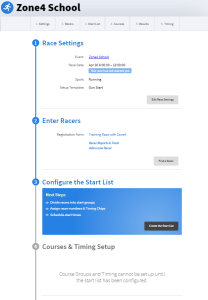
The first two pages have lots of options and tools, but we will skip those for now and head to step 3 Configure the Start List.
The first step in creating a Start List is creating Start Groups. Start groups determine the order that various groups might start racing. For example, in a running race you might be having multiple categories, such as 5km, 10km, and 20km distances. At other events you might break down start groups by Age, or other factors.

Sometimes all the racers will start at once. In that case you would select the lower option to keep all the racers in one group. For larger events though, it can be useful to split the racers into start groups


The Group Name can be edited by clicking on it and typing the new name, or by clicking “Edit Group” on the right.
You can also click and drag the right side to reorder the groups. This will change how the order they will appear on the start list.