Start with the output and what was published, then check fields, groups, courses and timing.
| Problem | What to do |
|---|---|
| Preview changed, live did not | Check the Output number and click Update Live Output. |
| Live output is blank | Clear may have been pressed, or the URL has the wrong output number. Publish a view again. |
| Racer is missing | Check they are in the race and group, then run Populate Racers. |
| Racer field is missing | In Race Configuration, turn on Contains Public Data for the field, then run Populate Racers. |
| Flag option is missing | The race has no province, country or nation field. Add one in Race Configuration. |
| Group is missing or stale | Check the Result Set, then run Populate Groups. |
| Ranking is stale | Check the group and crossing, then run Re-calculate calcs. |
| Crossing is missing | Check the course and the Timing Points filter. |
| Distance is wrong | Fix the crossing’s Distance (km) in Course Setup, then reload Broadcast. |
| Live Splits jumps around | Turn off Watching Bib, Auto Scroll Down, Auto Follow Leader and group cycling one at a time. |
| Graphic is cropped or blurry | Match the browser source to Window Width / Height and reset the browser zoom. |
| You made a new race file | Output URLs include the race. Copy each output’s new URL into your mixer. |
Some flags don’t display
- Check the flag option in Settings. Saving it makes the province or country field public.
- Use one spelling per place. “USA”, “United States” and “United States of America” can show different flags.
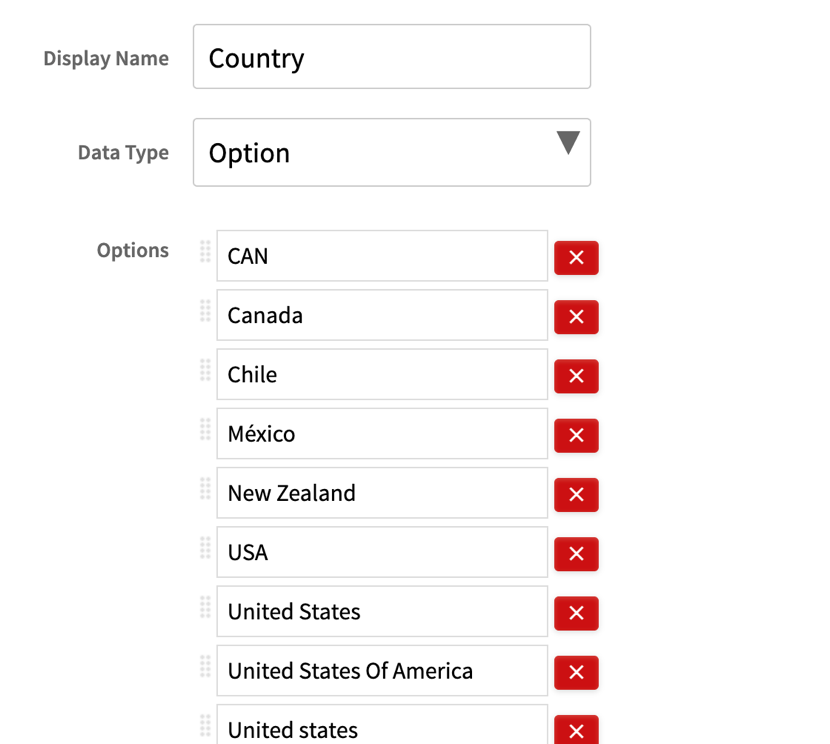 Merge duplicate spellings before race day.
FIS, UCI and other federations use NOC codes
Their races list nations as NOC codes, such as CAN or GER, not as countries. Choose NOC/FIS/UCI Country Flags for these races, not Country Flags.