
Pursuit races, especially ones that deviate from IBU rules, can get very complicated very quickly. If you are inexperienced with using Zone4 to time a Biathlon Pursuit, we recommend reaching out to us beforehand so we can make sure your event goes a smoothly as possible.
In a biathlon “domestic pursuit” format race, racers start on a five-second interval, and the start list is ordered by the racer’s standing in the previous race. To create a domestic pursuit race, select the appropriate template when creating a new race:

Assigning Start Times

For each start group, you’ll need to set a “First Start” and a “Last Start”. The first start time will be the time the first racer starts, and racers will be spaced by the interval set in the “interval” column – every 5 seconds by default – until the “Last Start”.
The “Last Start” represents the mass start time – this will be the start time set for the remainder of the people in the group.
If you aren’t sure what to use for the “last start” time, leave it blank and hit the Assign Start Times button – this will assign all racers in the group an interval start time. Then you can view the start list, and look down it until you find the racer you want to be first in the mass start. Whatever their time is should be the mass start time.
You must set a “Last start” time for each group in order for pursuit results to be calculated. If you are not mass starting any racers, enter the time of the last starter.
Results

When using the “Domestic Pursuit” template, your results should automatically use the “Group Start” option – this uses the start time of the first racer as the start time for all racers, to produce pursuit results. If you would like to display results that reflect the actual ski time only, (ie a “normalized” pursuit), change this setting to the “Use the Individual Start Time” option.
However, in order for the Use the Individual Start Time to work, you will have to set a start time for each athlete. This should be done based on their actual start time.
Go to the Timing Tab and click Manage Start Times. Next, select Individual Start Times. The rightmost column will need to be filled in with the scheduled start time. Even if the time appears there, if the text is grey, you will have to type it in for Zone4 to use it to calculate times.
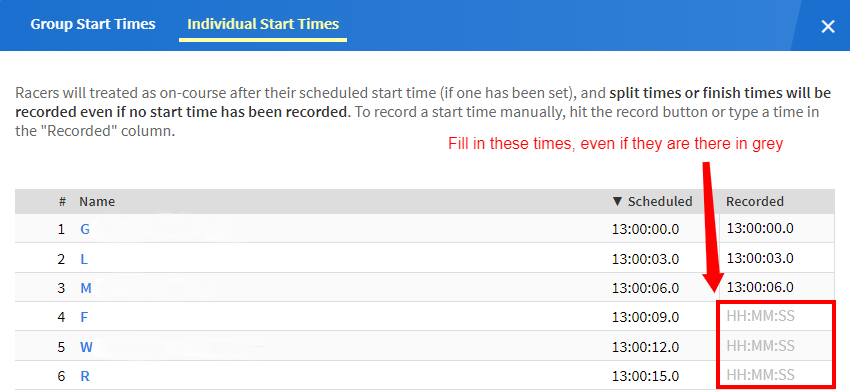
This will also have to be done in any Pursuit race that you want to use the Ski Time Results set for. If the Pursuit is not normalized, you will want to input the first start time for the whole group.